
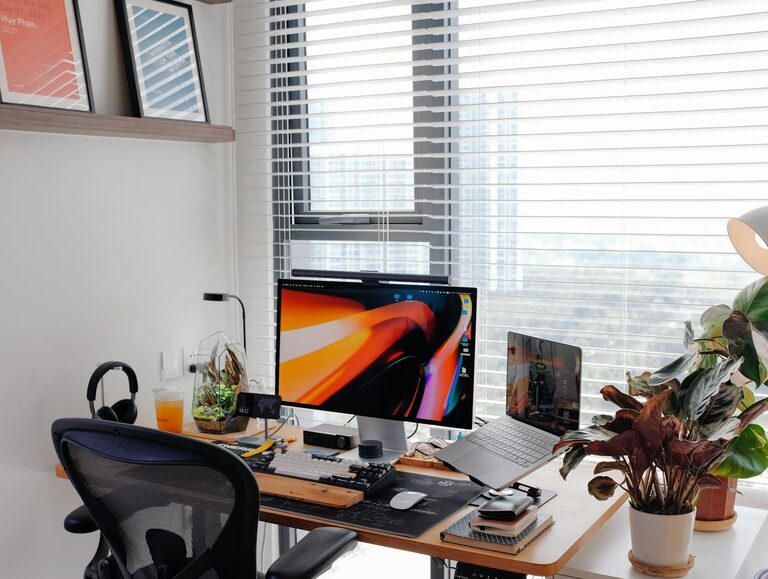
Creating a productive home workspace is essential for anyone working remotely or studying from home. A well-organised and comfortable area can help you stay focused, reduce distractions, and improve your overall work performance. Whether you have a dedicated room or just a small corner, there are plenty of tips you can follow to make your home workspace an efficient and enjoyable place to be.
Why a Dedicated Workspace Matters
Having a dedicated space for work helps your brain distinguish between work time and personal time. This separation can boost your concentration and make it easier to maintain healthy work habits. Even if space is limited, carving out a specific area solely for work tasks is beneficial.
Choosing the Right Location
Consider natural light
Set up your workspace near a window when possible. Natural light helps reduce eye strain and has been shown to improve mood and energy levels.
Minimise distractions
Choose a quiet spot away from household noise and high-traffic areas. If this isn’t possible, consider noise-cancelling headphones or white noise machines.
Assess your internet and power access
Make sure your workspace has a stable internet connection and enough power outlets for your devices, so you don’t need to constantly move equipment around.
Ergonomic Setup for Comfort and Health
Invest in a good chair
A comfortable, adjustable chair supports your posture and prevents back pain. Look for one with lumbar support, adjustable height, and armrests.
Desk height and position
Your desk should allow your arms to rest at a 90-degree angle when typing. If the surface is too high or low, it can cause strain on your shoulders and wrists.
Position your screen correctly
Place your computer monitor at eye level, about an arm’s length away. This helps avoid neck strain and reduces eye fatigue.
Organising Your Workspace
Declutter your desk
Keep only the essentials on your desk, such as your computer, notebook, and a pen holder. Too many items can distract and reduce your productivity.
Storage solutions
Use shelves, drawers, or organisers to keep papers and supplies out of sight. Label boxes and files to make it easy to find what you need quickly.
Cable management
Tidy cables with clips or sleeves to prevent tangling and create a neater appearance.
Lighting and Ambience
Use layered lighting
Combine natural light with task lighting, such as a desk lamp. Use warm bulbs to create a soothing atmosphere that reduces eye strain.
Add some greenery
Indoor plants can improve air quality and add a calming touch to your workspace.
Personal touches
Incorporate inspirational quotes, artwork, or photos to personalise your space and keep motivation high.
Managing Work-Life Balance
Set clear boundaries
Define your working hours and stick to them. When work is over, pack up your things to signal the end of the day.
Take regular breaks
Use techniques like the Pomodoro method (25 minutes work, 5 minutes break) to maintain focus and avoid burnout.
Avoid multitasking
Focus on one task at a time, and use tools like planners or digital apps to organise your workload.
Useful Equipment and Tools
Quality keyboard and mouse
These can improve comfort and speed, especially if you spend long hours typing.
External monitor
For laptops, adding a second screen can increase your workspace and help with multitasking.
Headphones
Noise-cancelling headphones enhance concentration in noisy environments.
Desk organiser
Keeps stationery and small items neatly arranged.
Maintaining Motivation and Focus
Set daily goals
Start each day by listing your priorities to stay organised and motivated.
Use productivity apps
Apps like Trello, Asana, or simple timers help you plan and track your tasks.
Stay connected
Regularly communicate with colleagues or classmates to maintain a sense of teamwork and reduce isolation.
Final Thoughts
Creating a productive home workspace doesn’t require a lot of space or expensive equipment. Prioritising comfort, organisation, and a clear separation between work and personal life can dramatically boost your efficiency and well-being. Experiment with different setups until you find what works best for you, and remember: a little effort in designing your workspace goes a long way in supporting your success.